13 January 2026
DNS Explained: The Backbone of the World Wide Web
How DNS works at a global scale, real-world DNS architecture, and a walkthrough of self-hosting an authoritative DNS server with PowerDNS.
Domain Name System ( DNS ) is one of the most critical infrastructure pieces of the internet. Every website visit, API call, or email delivery begins with a DNS query.
While most organizations rely on managed DNS providers, self-hosting a DNS nameserver can be a powerful learning experience and, in some cases, a practical solution for greater control, privacy, or experimentation.
In this blog, we will:
- Understand how DNS works at a global scale
- Explore real-world DNS architecture and infrastructure
- Walk through self-hosting an authoritative DNS server using PowerDNS
This article is aimed at system administrators, DevOps engineers, and curious learners who want to go deeper than “just use a managed DNS provider.”
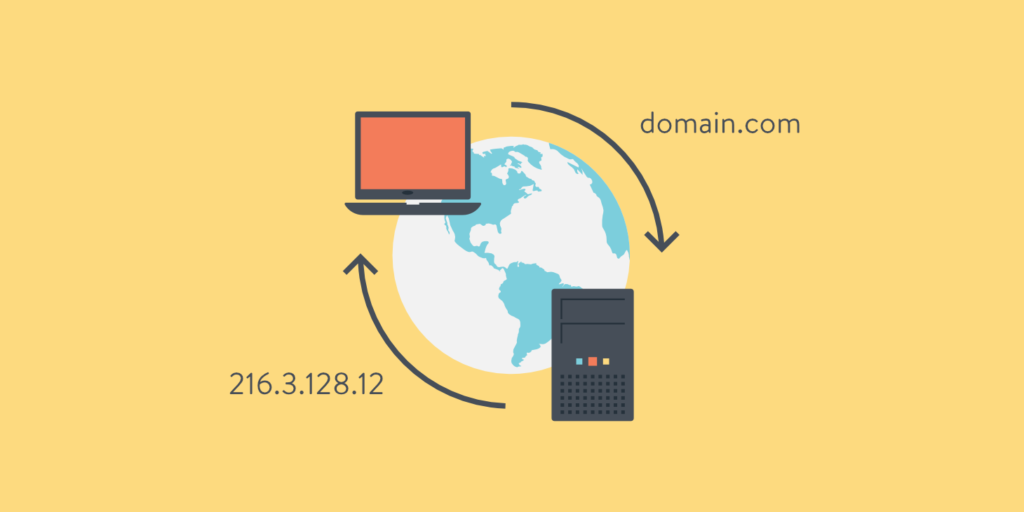
What Problem DNS Solves ?
At its core, DNS exists to solve a human problem, not a technical one.
Computers are extremely good at working with numbers. Humans are not.
The internet, however, must work for both.
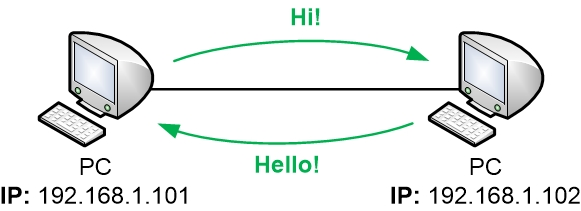
Why Humans Cannot Use IP Addresses ?
Every device connected to the internet is identified by an IP address, such as:
IPv4: 37.27.249.121
IPv6: 2001:db8:85a3::8a2e:370:7334
While these numbers are efficient for machines, they are fundamentally unsuitable for humans:
- They are hard to remember
- They have no semantic meaning
- They change frequently (cloud, load balancers, failovers)
- IPv6 addresses are even longer and more complex
Humans think in names, not numbers.
We remember:
- google.com
- github.com
- example.com
Not:
- 142.250.195.78
The core problem DNS solves is decoupling identity from location:
- A name represents a service or organization
- An IP address represents where that service currently lives
This separation allows infrastructure to evolve without breaking human access.
Why Centralized Name Mapping Doesn’t Scale ?
In the very early days of the internet, name resolution was centralized.
There was a single file: HOSTS.txt or /etc/hosts
Every hostname and IP mapping lived in this file, maintained by a central authority.
Each computer periodically downloaded the latest version.
This approach worked — until it didn’t.
The Problems with Centralization :
- Single Point of Failure
- If the central server went down, name resolution stopped
- Administrative Bottleneck
- Every new host required manual approval and distribution
- Update Latency
- Changes propagated slowly
- Stale data caused outages
- No Delegation
- One organization controlled all names
- No ownership model
- Security Risk
- Anyone who compromised the central file could hijack the entire internet
As the number of connected machines grew from hundreds to millions and now billions this model became impossible.
The internet needed a distributed naming system.
Why DNS Must Be Distributed ?
DNS is distributed by design because no single system can know everything.
Instead:
- Responsibility is split
- Authority is delegated
- Queries are answered locally whenever possible
Each domain owner controls their own namespace:
- Google controls
google.com - GitHub controls
github.com - You control your domain
There is no “master DNS database” for the internet and that is intentional.
Why DNS Is Hierarchical ?
Distribution alone is not enough. Without structure, discovery would still be inefficient.
DNS solves this with hierarchy.
.
└── com
    └── example
        └── www
A strong deep-technical blog must move through four layers:
- Conceptual model – what DNS is and why it exists
- Real internet behavior – how DNS works globally
- Hands-on mechanics – commands, configs, files
- Operational reality – security, failure modes, best practices
DNS Hierarchy in Detail
DNS is organized as an inverted tree structure, starting from the root and branching down to individual domains. This hierarchy ensures efficient delegation and scalability.
Root Servers
At the top of the DNS hierarchy are the root servers. There are 13 logical root server clusters (labeled A through M), operated by different organizations worldwide. These servers maintain the master list of all top-level domains (TLDs).
Root servers don’t contain actual domain records but point resolvers to the authoritative servers for each TLD. They respond with NS records directing queries to the appropriate TLD servers.
Top-Level Domains (TLDs)
TLDs are the highest level of domain names, appearing after the last dot. They are divided into categories:
- gTLDs (Generic TLDs): .com, .org, .net, .info, .biz
- ccTLDs (Country Code TLDs): .us, .uk, .de, .in, .jp
- New gTLDs: .app, .dev, .tech, .blog
Each TLD has its own set of authoritative name servers managed by registries (like Verisign for .com or individual country registries).
Authoritative Name Servers
For each domain, there are authoritative name servers that hold the actual DNS records. These are typically provided by:
- Domain registrars (when you register a domain)
- DNS hosting providers (like Cloudflare, Route 53, DigitalOcean)
- Self-hosted servers (for organizations with their own infrastructure)
Authoritative servers are the source of truth for a domain’s records and are responsible for responding to queries about that domain.
DNS Resolution Process: Step-by-Step
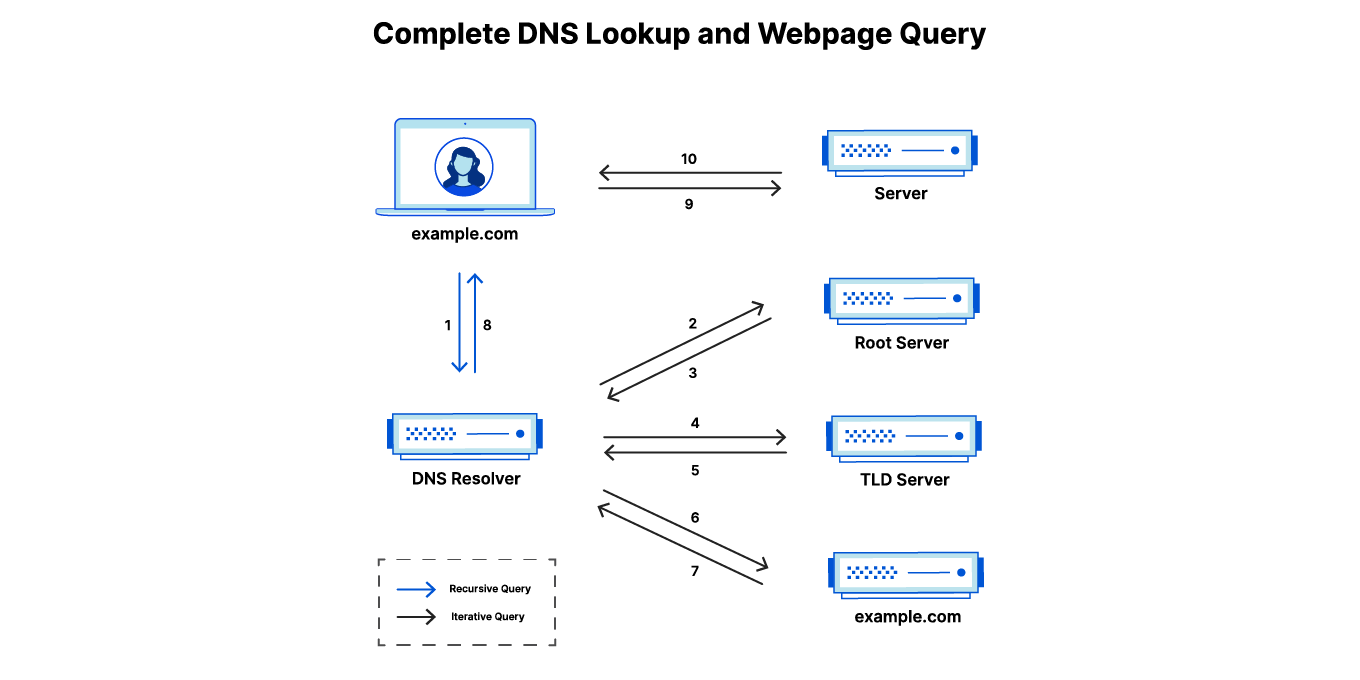
When you type “example.com” into your browser, a complex resolution process occurs behind the scenes. Let’s trace through a typical DNS lookup:
Step 1: Local Cache Check
Your operating system and browser maintain a DNS cache. The resolver first checks these local caches for the requested domain. If found and not expired, it returns the cached IP address immediately.
Step 2: Recursive Resolver Query
If not cached locally, your device queries a recursive DNS resolver (usually provided by your ISP, or public ones like 8.8.8.8 or 1.1.1.1). This resolver acts on your behalf to find the answer.
Step 3: Root Server Query
The recursive resolver starts at the root. It queries one of the 13 root servers asking “Who handles .com domains?”
The root server responds with NS records pointing to the TLD servers for .com.
Step 4: TLD Server Query
The resolver queries the .com TLD servers: “Who handles example.com?”
The TLD server responds with NS records pointing to example.com’s authoritative servers.
Step 5: Authoritative Server Query
Finally, the resolver queries example.com’s authoritative servers: “What is the IP address for example.com?”
The authoritative server returns the A or AAAA record with the IP address.
Step 6: Response and Caching
The recursive resolver returns the IP to your device, which caches it. Future requests for the same domain will be served from cache until expiration.
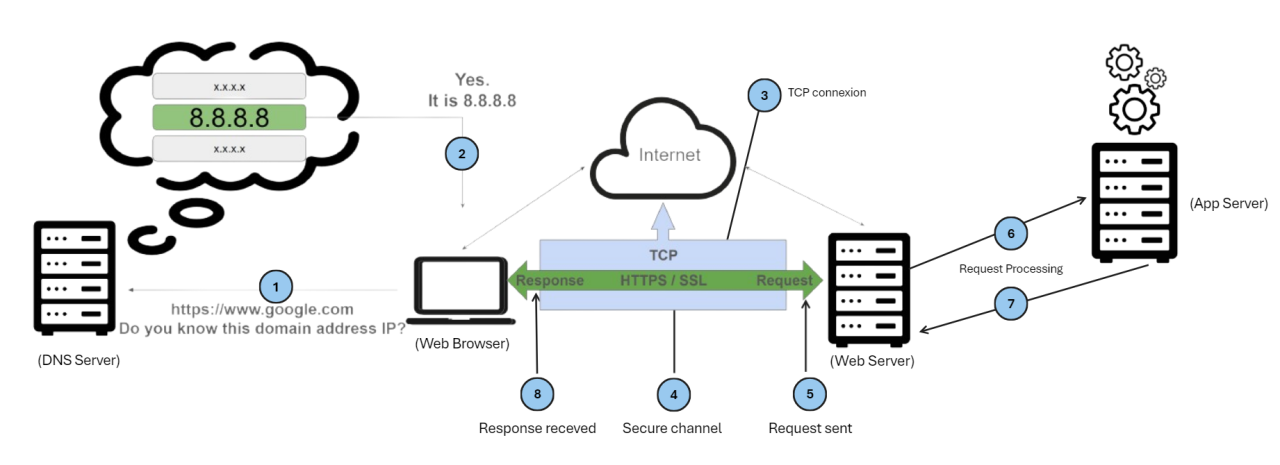
This process typically takes 20-100ms and involves multiple network round trips across the globe.
DNS Record Types
DNS stores different types of records, each serving a specific purpose. Here are the most common ones:
A Record (Address Record)
Maps a domain name to an IPv4 address.
example.com. IN A 93.184.216.34AAAA Record (IPv6 Address Record)
Maps a domain name to an IPv6 address.
example.com. IN AAAA 2606:2800:220:1:248:1893:25c8:1946CNAME Record (Canonical Name)
Creates an alias from one domain to another.
www.example.com. IN CNAME example.com.MX Record (Mail Exchange)
Specifies mail servers for the domain.
example.com. IN MX 10 mail.example.com.The number (10) indicates priority; lower numbers have higher priority.
TXT Record (Text Record)
Stores arbitrary text data, commonly used for SPF, DKIM, and verification.
example.com. IN TXT "v=spf1 include:_spf.google.com ~all"NS Record (Name Server)
Delegates a subdomain to specific name servers.
example.com. IN NS ns1.example.com.SOA Record (Start of Authority)
Contains administrative information about the zone.
example.com.    IN  SOA   ns1.example.com. admin.example.com. (
    2023010101 ; Serial
    3600       ; Refresh
    1800       ; Retry
    604800     ; Expire
    86400      ; Minimum TTL
)
PTR Record (Pointer Record)
Maps an IP address back to a domain name (reverse DNS).
34.216.184.93.in-addr.arpa. IN PTR example.com.These records work together to provide complete domain information and enable various internet services.
DNS Infrastructure: The Global Network
DNS operates through a distributed network of servers working in harmony:
Recursive Resolvers
These are the “middlemen” of DNS. They accept queries from clients and perform the full resolution process on their behalf. Popular public recursive resolvers include:
- Google Public DNS (8.8.8.8, 8.8.4.4)
- Cloudflare (1.1.1.1, 1.0.0.1)
- Quad9 (9.9.9.9)
Recursive resolvers implement aggressive caching to improve performance and reduce load on authoritative servers.
Authoritative Servers
These hold the actual zone files and are the definitive source for domain information. They come in two types:
- Primary (Master): Contains the original zone file
- Secondary (Slave): Replicates data from the primary for redundancy
Authoritative servers are organized hierarchically and delegate subdomains to other servers.
Caching: The Performance Booster
DNS heavily relies on caching at multiple levels:
- Browser Cache: Short-term storage in the browser
- OS Cache: System-level DNS cache
- Resolver Cache: Recursive resolvers cache responses
- Authoritative Cache: Some authoritative servers implement caching
TTL (Time To Live) values control how long records are cached. Shorter TTLs provide more current data but increase query volume.
Anycast: Global Distribution
Many DNS servers use anycast routing, where the same IP address is announced from multiple physical locations worldwide. This ensures queries are routed to the nearest server, reducing latency.
For example, the root servers are anycasted across hundreds of locations globally, ensuring fast responses from anywhere on earth.
DNS Security: Protecting the Foundation
DNS was designed without security in mind, making it vulnerable to various attacks. Modern solutions address these issues:
DNSSEC (DNS Security Extensions)
DNSSEC adds cryptographic signatures to DNS records, ensuring:
- Data Integrity: Records haven’t been tampered with
- Authentication: Responses come from legitimate servers
- Non-existence Proofs: Proves when domains don’t exist
DNSSEC uses a chain of trust from the root down to individual domains. Keys are managed hierarchically, with the root KSK (Key Signing Key) being the ultimate trust anchor.
Encrypted DNS Protocols
Traditional DNS sends queries in plaintext, allowing interception and manipulation.
- DoT (DNS over TLS): Encrypts DNS queries over port 853
- DoH (DNS over HTTPS): Sends DNS queries over HTTPS (port 443), blending with normal web traffic
These prevent eavesdropping and make blocking DNS traffic more difficult.
Common DNS Attacks
DNS Spoofing/Cache Poisoning
Attackers send fake responses to recursive resolvers, polluting their cache with malicious IP addresses.
DDoS Amplification
DNS servers can be used to amplify DDoS attacks since UDP responses can be much larger than queries.
DNS Tunneling
Malware uses DNS queries to exfiltrate data by encoding information in domain names.
NXDOMAIN Attacks
Overloading resolvers with queries for non-existent domains to exhaust resources.
Mitigation Strategies
- Implement DNSSEC for your domains
- Use encrypted DNS (DoT/DoH) clients
- Deploy DNS firewalls (like Response Policy Zones)
- Monitor for anomalous query patterns
- Use rate limiting on authoritative servers
Self-Hosting an Authoritative DNS Server with PowerDNS
While managed DNS providers are convenient, self-hosting gives you complete control. PowerDNS is an excellent open-source authoritative DNS server. Let’s set it up:
Installation with Docker
Use Docker Compose for easy setup with MySQL backend. Create a docker-compose.yml file:
version: '3.8'
services:
  mysql:
    image: mysql:8.0
    environment:
      MYSQL_ROOT_PASSWORD: your_mysql_root_password
      MYSQL_DATABASE: pdns
      MYSQL_USER: pdns
      MYSQL_PASSWORD: your_pdns_password
    volumes:
      - mysql_data:/var/lib/mysql
    networks:
      - pdns

  powerdns:
    image: pschiffe/pdns-mysql:latest
    environment:
      MYSQL_HOST: mysql
      MYSQL_PORT: 3306
      MYSQL_USER: pdns
      MYSQL_PASS: your_pdns_password
      MYSQL_DB: pdns
    ports:
      - "53:53/tcp"
      - "53:53/udp"
      - "8081:8081"
    depends_on:
      - mysql
    networks:
      - pdns

volumes:
  mysql_data:

networks:
  pdns:
Run the services:
docker-compose up -dConfiguration
PowerDNS auto-configures with the MySQL backend. Access the web interface at http://localhost:8081.
Database Setup
The MySQL database initializes automatically. Create zones via the API or command line:
docker-compose exec powerdns pdnsutil create-zone example.comAdd some records:
sudo pdnsutil add-record example.com @ A 192.168.1.10
sudo pdnsutil add-record example.com www CNAME example.com
sudo pdnsutil add-record example.com mail MX "10 mail.example.com"
DNSSEC Setup
Enable DNSSEC for the zone:
sudo pdnsutil secure-zone example.com
sudo pdnsutil set-nsec3 example.com
This generates keys and signs the zone automatically.
Testing
Test your setup:
dig @localhost example.com A
nslookup example.com localhost
Production Considerations
- Use MySQL clustering or replication for high availability
- Implement monitoring and alerting for both PowerDNS and MySQL
- Set up secondary PowerDNS servers for redundancy
- Configure proper firewall rules (UDP/TCP port 53)
- Implement rate limiting and DDoS protection
- Regularly update Docker images and patch PowerDNS
Self-hosting DNS requires careful maintenance but provides maximum control and privacy.
DNS Troubleshooting and Best Practices
DNS issues can be frustrating but are usually solvable with systematic debugging.
Common Issues and Solutions
Slow Resolution
- Check resolver performance
- Clear local DNS cache:
sudo systemd-resolve --flush-caches - Switch to faster public resolvers
- Check for network congestion
NXDOMAIN Errors
- Verify domain registration status
- Check for typos in domain names
- Confirm authoritative servers are responding
- Test with different resolvers
Propagation Delays
DNS changes can take 24-48 hours to propagate globally due to caching. Use tools like:
dig @8.8.8.8 example.com A
dig @1.1.1.1 example.com A
DNS Leaks
When using VPNs, DNS queries might bypass the tunnel. Test with:
nslookup example.comShould show VPN resolver IPs, not local ISP.
Best Practices
For Domain Owners
- Use multiple authoritative servers for redundancy
- Implement DNSSEC
- Set appropriate TTL values (lower for dynamic content)
- Monitor DNS performance and availability
- Use CDN-integrated DNS for global performance
For Developers
- Understand DNS in your application architecture
- Implement proper error handling for DNS failures
- Use connection pooling to reduce DNS lookups
- Consider DNS prefetching in web applications
For System Administrators
- Monitor DNS server logs for anomalies
- Implement rate limiting to prevent abuse
- Keep DNS software updated
- Have backup DNS providers ready
- Document your DNS configuration thoroughly
DNS reliability is crucial for internet availability. Regular monitoring and proactive maintenance prevent most issues.
Learning Resources
- RFC 1035 - Domain Names - Implementation and Specification
- DNSSEC Practice Statement
- PowerDNS Documentation
- Cloudflare Learning Center - DNS
- DNS Made Easy - DNS Glossary
- Practical DNSSEC
- DNS over HTTPS (DoH) RFC 8484
Conclusion
DNS is the unsung hero of the internet, silently translating human-readable names into machine-routable addresses billions of times per day. Its distributed, hierarchical design has proven remarkably resilient, scaling from a handful of hosts to billions of connected devices.
Understanding DNS goes beyond technical curiosity—it’s essential for anyone working with internet technologies. Whether you’re a developer troubleshooting connectivity issues, a system administrator designing resilient infrastructure, or simply a user wanting to understand how the web works, DNS knowledge is fundamental.
As the internet evolves with new protocols like DNS over HTTPS and DNSSEC adoption grows, DNS continues to adapt while maintaining its core principles of decentralization and reliability. The next time you type a URL into your browser, remember the complex, global infrastructure that makes it all possible.
DNS truly is the backbone of the World Wide Web.